Guide to Building a Full-Stack App with AI Agents
Monorepo, APIs, DBs, O11y, n8n, storage.. You become the architect. The agent is the hands.
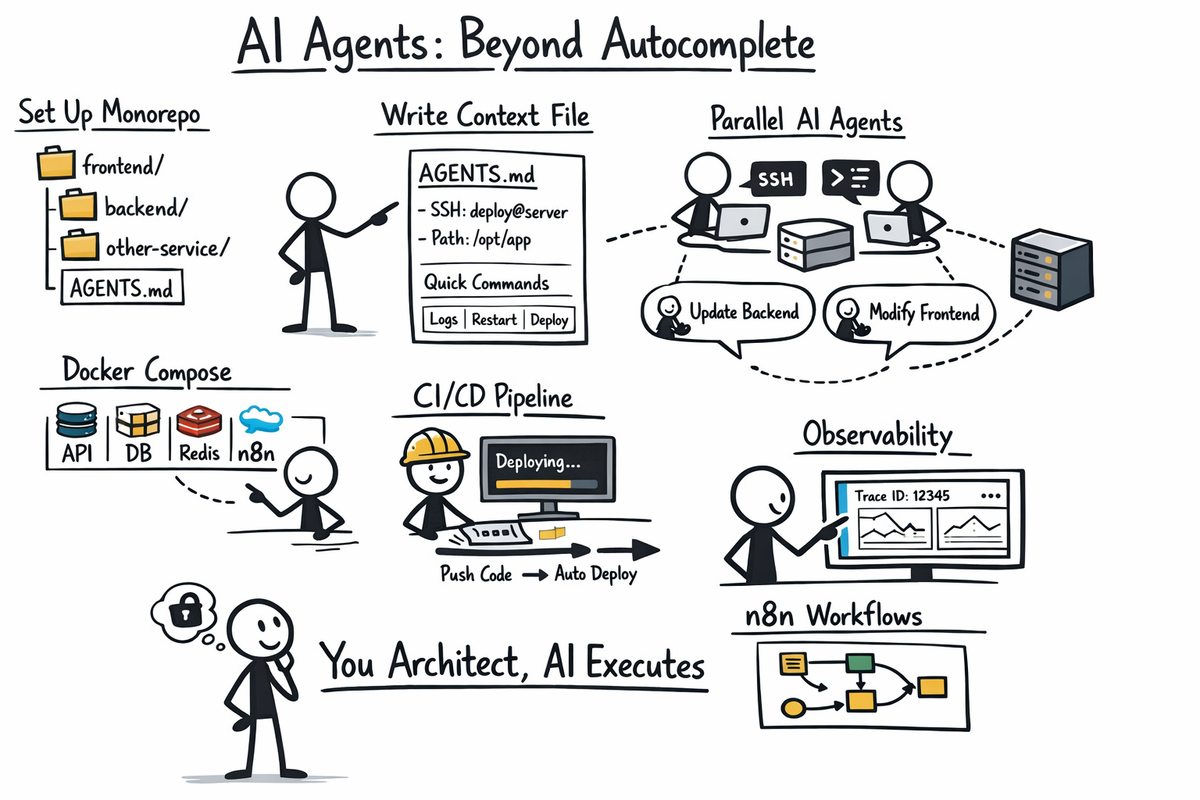
Most tutorials about AI-assisted development show you autocomplete. That's table stakes. The real leverage comes when AI agents SSH into servers, run commands, and work in parallel while you think about architecture.
Here's the actual process I use to build production apps—frontend, backend, orchestration, storage, auth, payments—writing almost no code manually.
Step 1: monorepo ftw
Create three directories:
your-app/
├── frontend/          # Next.js on Vercel
├── services/
│   ├── backend/       # NestJS API
│   └── other-service/ # Python, Go, whatever
├── docker-compose.yml
├── AGENTS.md          # Critical: your AI context file
└── .github/
    ├── copilot-instructions.md
    └── workflows/
The AGENTS.md file is the most important file in your repo. Every AI agent reads it before each task. Document everything here: architecture, paths, commands, gotchas.
Step 2: add context files
Your AGENTS.md or .github/copilot-instructions.md should include:
- Project structure with one-line descriptions per folder
- Server details: SSH user, IP, project path on server
- Quick commands: how to deploy, check logs, restart services
- Database rules: migration patterns, column type quirks
- Environment variables: where they live (Vercel dashboard, server .env)
- Do/Don't table: explicit rules the agent must follow
Example structure:
## Server

Hetzner has great, cheap and reliable servers. (https://hetzner.com/)
Create a user (ie: deploy) for quick ssh access.

- SSH: `ssh deploy@your-server-ip`

## deployment

Push to main → GitHub Actions deploys automatically

## Set rules

- Always specify explicit `type` for nullable columns
- Never commit .env files
- ...
Step 3: services
A production stack needs these containers. All orchestrated via Docker Compose:
| Service | Tool | Purpose |
|---|---|---|
| API | NestJS | REST/GraphQL backend |
| Database | Postgres | Primary data store |
| Cache/Queue | Redis | Sessions, job queues |
| Storage | MinIO | S3-compatible file storage |
| Workflows | n8n | Visual automation (AI calls, webhooks) |
| Logs | Loki + Grafana | Log aggregation |
| Errors | Sentry | Exception tracking |
Frontend goes on Vercel (free tier). Backend goes on a €12/month VPS with Docker.
Step 4: AI Agent config
In VS Code with GitHub Copilot, agents can:
- Read and edit any file in your repo
- Run terminal commands (including SSH)
- Make HTTP requests
- Work in parallel (multiple agent sessions)
The agent reads your AGENTS.md automatically. When you ask it to "deploy the backend," it knows the SSH command. When you ask it to "check why the job failed," it can SSH in, read logs, and report back.
Step 5: Observability
Add these to every request from day one:
- Correlation ID: A UUID that follows a request across all services
- Structured logging: JSON logs with Pino (Node) or structlog (Python)
- Log collection: Promtail collects Docker logs → Loki stores them → Grafana queries them
When something breaks, you search one correlation ID and see the entire trace across every service.
Step 6: n8n
Complex AI pipelines don't belong in application code. They change too often.
Use n8n for:
- Receiving webhooks from your API
- Calling GPT-4 Vision or other AI models
- Transforming data between steps
- Calling microservices
- POSTing results back to your API
Export workflows as JSON. Commit them to services/backend/workflows/. Version control everything.
Step 7: CI/CD
Create .github/workflows/deploy.yml:
on:
  push:
    branches: [main]

jobs:
  deploy:
    runs-on: ubuntu-latest
    steps:
      - uses: actions/checkout@v4
      - name: Deploy to server
        run: |
          ssh deploy@${{ secrets.SERVER_IP }} "
            cd /opt/your-app &&
            git pull &&
            docker compose build backend &&
            docker compose up -d backend
          "
No Kubernetes. No Terraform. A bash script works.
Step 8: Parallel Agents
When building a feature:
- Open agent session 1: "Update the backend to add user preferences endpoint"
- Open agent session 2: "Update the frontend settings page to call the new preferences API"
- Open agent session 3: "Write integration tests for user preferences"
They share git state. Review each diff. Merge when ready.
The Files You Need
Minimum viable AI-assisted project:
AGENTS.md                    # Architecture + commands + rules
.github/copilot-instructions.md  # Symlink or duplicate of AGENTS.md
.github/workflows/deploy.yml # Auto-deploy on push
docker-compose.yml           # All services defined
.env.example                 # Template for env vars (committed)
.env                         # Actual secrets (gitignored)
What changes
The feedback loop collapses. You describe requirements. The agent implements. You review diffs. Production in minutes.
The agent doesn't know your codebase better than you—yet. But it holds the entire context while you think about the next feature. It runs the commands you'd forget. It updates the docs you'd skip.
You become the architect. The agent is the hands.